

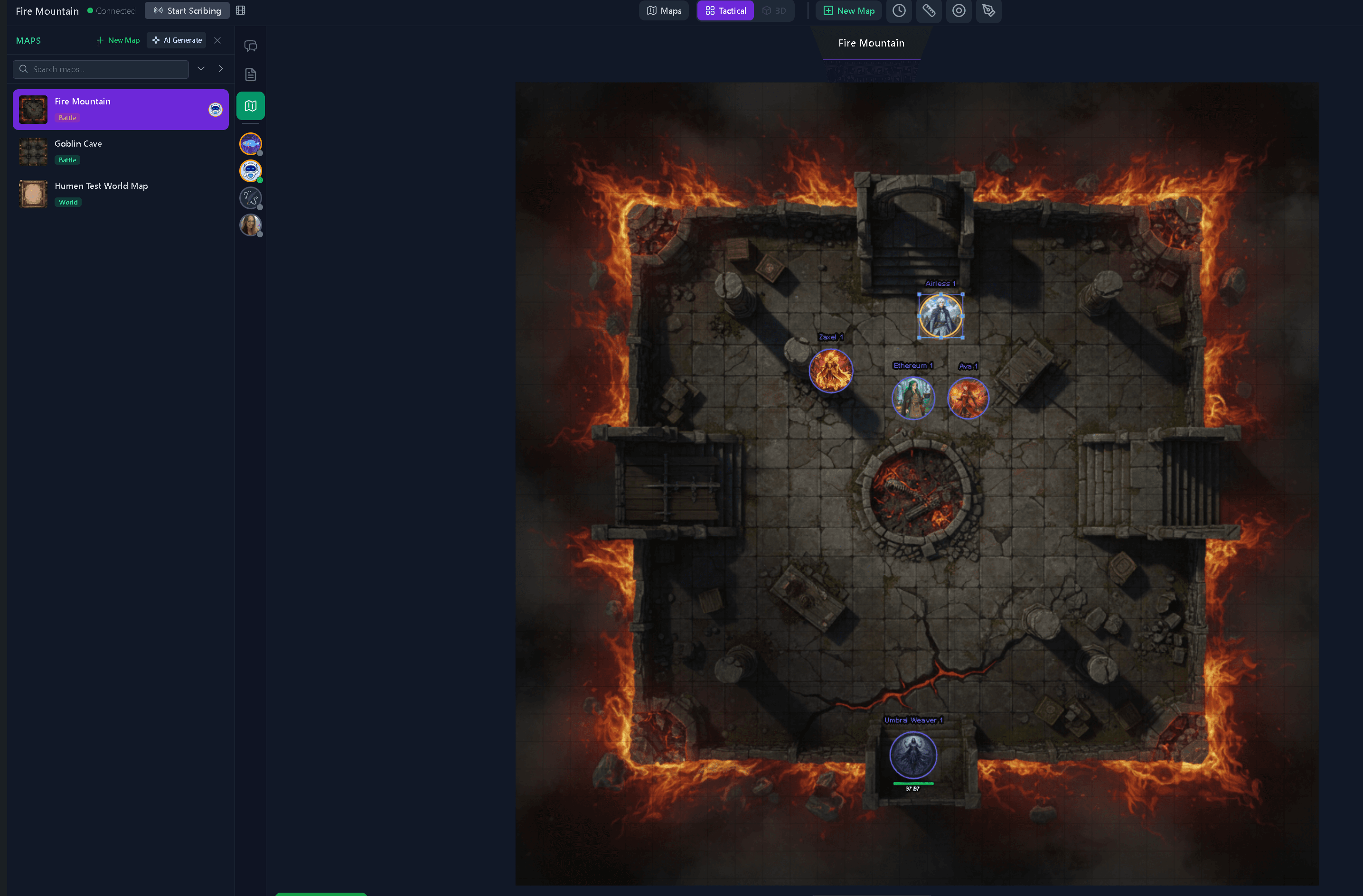
TL;DR — Quick Answer
Tavern Scribe is a free TTRPG notetaker and virtual tabletop in one workspace. The free tier (Tavern Guest) gives you live maps, tokens, fog of war, initiative, shared party notes, dice, and a searchable campaign journal, with zero credit card required. AI session recaps are optional and run on metered "silver," and your first campaign starts with 100 free silver, so the note-taking and the VTT itself stay free as long as you use them. It runs in any browser, works for D&D 5e, Pathfinder 2e, Daggerheart, Call of Cthulhu, and homebrew systems, and syncs every player at the table in real time.
Looking for the product page rather than the walkthrough? See the free virtual tabletop with AI campaign memory.
Most TTRPG tables already use four tools that don't talk to each other: a virtual tabletop for the map, Discord for chat, a notes app for the campaign, and a Google Doc for the recap that nobody actually reads. The notes don't know what happened on the map. The map doesn't know what the party decided in the inn. And the recap is whatever the DM remembered to type at 1am.
This post is a practical walkthrough of how a free TTRPG notetaker built on top of a free virtual tabletop changes that, and how to start using one tonight without paying anything.
What is a TTRPG notetaker?
A TTRPG notetaker is a tool dedicated to capturing what happens at a tabletop RPG table: characters, NPCs, locations, quests, session beats, lore, and the small running jokes that make a long campaign feel alive. Unlike a general notes app (Notion, OneNote, Obsidian), a TTRPG notetaker is structured around the way a campaign actually grows, session-by-session, with relationships between characters and locations as first-class objects rather than free-form pages.
A good TTRPG notetaker answers three questions you ask constantly while running a campaign:
- What did we do last session?
- Have we met this NPC before, and what did they want?
- Which quest threads are still open?
If your current notes can't answer those quickly, you don't have a notetaker. You have a graveyard for paragraphs.
Why combine a notetaker with a virtual tabletop?
Because the notes and the table are the same campaign. Splitting them is what causes the 45-minute "where was I?" archaeology that opens every prep session. Tavern Scribe is built around the idea that the virtual tabletop and the campaign workspace should share one state: when a player drags a token onto a tavern location, the location page already knows it. When the bard improvises an NPC name, the campaign journal can catch it.
How do I start using a free virtual tabletop tonight?
Here's the no-credit-card path, end to end. You can have a session running in under 10 minutes.
- Create an account. Sign up at tavernscribe.com. The free plan ("Tavern Guest") is the default; you don't have to opt out of anything paid.
- Spin up a campaign. Name it, invite players, and create your characters for free. Your first campaign starts with 100 free silver for optional AI processing.
- Upload a map. Drag any PNG or JPG into the VTT. Set the grid scale once and the system remembers it per map.
- Add tokens. Drop in PC tokens, then NPC tokens. Tokens carry their character sheet, HP, and conditions with them.
- Roll initiative. Initiative tracker is on the same screen as the map, no second tab.
- Take notes as you play. Shared session notes are visible to the party in real time. The DM can mark a note as DM-only with one click.
- End the session. Optional: upload the session audio for an AI recap. Skip this and the notes are still yours.
That core flow is free. The only thing that costs anything is the optional AI recap step, which is metered in silver. Your first campaign starts with 100 free silver, and you can run a campaign forever without ever buying more.
What's actually free vs. paid?
This is the question that kills most "free VTT" claims, so here's the straight answer.
| Feature | Tavern Guest (free) | Paid tiers |
|---|---|---|
| Live virtual tabletop (maps, tokens, fog, live dice and party chat) | Free | Free |
| Initiative tracker + combat flow | Free | Free |
| Shared party notes + DM notes | Free | Free |
| Campaign journal (sessions, NPCs, locations, quests) | Free | Free |
| Item & creature codex | Free | Free |
| Character sheets | Free | Free |
| AI-generated PCs / NPCs | Pay-per-use (silver) | Monthly silver included |
| Timeline events | Pay-per-use (silver) | Monthly silver included |
| AI Chat | Pay-per-use (silver) | Monthly silver included |
| AI session recap + newspaper articles | Pay-per-use (silver) | Monthly silver included |
In other words: the notetaker and the virtual tabletop are both free, full-featured, and not feature-gated. Paid plans buy you AI compute, not access. See the full breakdown on the pricing page.
How is this different from Roll20 or Foundry?
Both Roll20 and Foundry VTT are excellent virtual tabletops. They are not notetakers. Foundry requires a one-time license; Roll20's free tier lacks dynamic lighting and asset storage. Neither was built to be a shared campaign memory that updates as you play.
Tavern Scribe is the inverse design: the campaign workspace is the primary product, and the VTT is one of its surfaces. That means the same tool that runs your battle map also tracks the bard's relationship with the duke and surfaces the timeline of every session.
If you only need a map and dice, Foundry is great. If you need notes and a map and they should know about each other, without paying, that's the gap Tavern Scribe fills.
How do I track NPC relationships across long campaigns?
This is where most TTRPG notetakers fall apart at session 20. Tavern Scribe handles it three ways:
- NPC pages auto-update from session content. When you mention "Lord Cassian" in shared notes or in an AI-processed session recap, his page picks up the new context.
- Location pages keep a roster of NPCs tied to that place, so when the party returns to the Whispering Lantern Inn, you see who they met there last time.
- The campaign timeline is filterable by character, location, and session, so "every scene featuring Cassian" is one click.
This is the part that gets harder, not easier, in a generic notes app, because a generic notes app doesn't know that "Lord Cassian" on page 14 and "Cassian" in last session's recap are the same person.
Does the free tier work for online, in-person, and hybrid play?
Yes, and they're the same product. The VTT runs in any modern browser on desktop. Online players see the same map, tokens, and notes in real time. Hybrid games (some at the table, some remote) work because every participant connects the same way.
For in-person tables that don't want a screen between players, you can still use Tavern Scribe purely as a notetaker. Load the campaign journal on the DM's device, ignore the map, and use it the way you'd use a session notebook that doesn't lose pages.
FAQ
Is there really a free virtual tabletop with no time limit?
Yes. The Tavern Guest tier has no trial countdown and no feature unlock wall on the VTT itself. The map, tokens, fog of war, initiative, party chat, and shared notes are all free for as long as your campaign runs.
What systems does the free TTRPG notetaker support?
D&D 5e, Pathfinder 2e, Daggerheart, Call of Cthulhu, OSR-style games, and generic / homebrew systems. The notetaker is system-agnostic. It tracks the campaign (characters, NPCs, locations, quests, sessions), not the ruleset.
Can my whole party take notes at the same time?
Yes. Shared party notes are collaborative in real time. The DM can also keep a separate DM-only notes layer that players don't see.
Do I need to install anything?
No. Tavern Scribe runs in any modern browser (Chrome, Firefox, Safari, Edge) on desktop, tablet, and mobile.
How do I get a session recap automatically?
Upload the session audio after you play and Tavern Scribe generates a structured recap and newspaper articles. This step uses silver (the metered AI currency); your first campaign starts with 100 free silver, and the rest of the platform stays free regardless of whether you use it. See pricing for silver packs and monthly subscriptions.
Try it tonight
If your current setup involves three browser tabs and a Google Doc named "campaign notes", you'll feel the difference in the first session. The free tier gives you the full notetaker, the full virtual tabletop, and your first campaign starts with 100 free silver to try AI processing, no credit card, no countdown.
Start a campaign, invite your party, drop in a map. The notes that used to live in Discord live in the campaign now. The map and the notes know about each other. Prep starts with "here's what's open" instead of "wait, where were we?"
Tags: Ttrpg Notetaker, Free Virtual Tabletop, Dungeon Master Tips, Campaign Management, Session Notes, Vtt
