

TL;DR
The Tavern Scribe VTT is free to use. No install, no credit card, no feature gating on the VTT itself. It runs in any browser and keeps every player in sync: tokens, fog of war, initiative, music, dice rolls, and chat all update in real time. DMs get weather effects, a spell codex, in-session shops, and a Start Scribing button that records the whole session for later. AI tools are optional: they're there when you want help filling in the blanks, and out of the way when you don't.
Most virtual tabletops are basically map viewers with extras bolted on. You drop a map, drag some tokens, and manage everything else across Discord tabs, Google Docs, and a playlist you scramble to queue up mid-combat. Tavern Scribe was built to be convenient: the VTT is the full session workspace, and everything the table needs lives inside one screen.
This is a full walkthrough of what you can actually do in it.
Live Multiplayer Map and Tokens
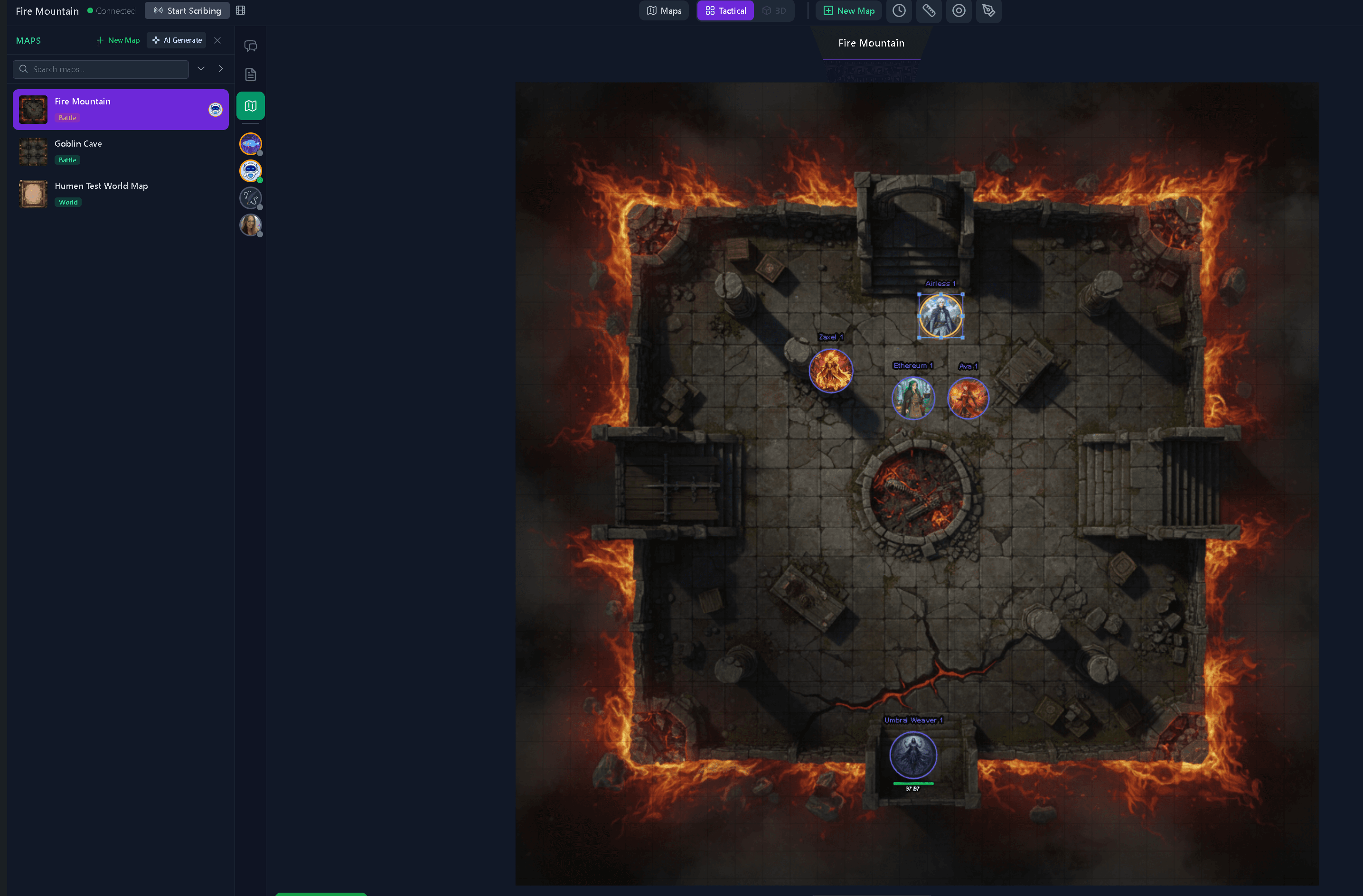
Every session starts with a map. Upload any image file, set your grid scale once (5 ft, 10 ft, or custom), and the tool remembers it for that map going forward. From there, tokens live on the map:
- Characters carry their full stats, HP, conditions, and portrait
- Creatures and NPCs can be dragged from the built-in creature library directly onto the map
- Locations drop as visual markers linked to your campaign location pages
Movement is live. When the DM or a player drags a token, everyone at the table sees it move instantly. No delay, no refresh, no "did that go through?" HP changes, conditions, everything updates the same way.
DMs can move any token. Players move only the tokens assigned to them.
Fog of War
The fog of war is a full brush-based reveal system, not a simple click-to-reveal tile grid. DMs paint over the map to reveal or hide areas however they want. You can manage multiple fog layers independently, and a view-as-player button lets you see exactly what any specific player can see before you reveal anything.
When the DM reveals an area, every player's view updates right away.
Combat: Initiative, Spell Templates, and Quick HP
Initiative Tracker
The initiative board is part of the main view. Click any token to add them to the initiative order. Combatants can be grouped together to act on the same turn. Once combat starts, rolls for enemies can be auto-generated, the turn order is visible to everyone, and the active combatant's turn triggers a banner notification with an optional camera pan to their token.
When it's your turn, you see your banner. When it's someone else's, you see their name.
Spell Area Templates
Spell placement is visual. Pick a shape (circle, cone, line, or cube), drag to size and rotate, and a preview follows your cursor. Lock a spell template onto the map for as long as the spell lasts. DMs can clear all locked templates at once.
Every player sees the same spell footprint.
Quick HP
Select a token and open the HP window from the token controls. It shows current HP, max HP, and temp HP with quick adjustment buttons, a color-coded health bar, and a field for entering any number. Every HP change goes out to the whole table the moment you confirm it.
Start Scribing: Record Your Sessions While You Play
The Start Scribing button in the top bar starts a session recording. A live timer shows how long you've been recording. When you stop, the recording saves to that session automatically.
From the recordings library inside the VTT, you can:
- Browse past sessions tied to the current campaign
- Play back a session in the built-in viewer, which shows the map and token state as it happened
- Download the recording to keep or share outside the platform
- Upload a session audio file to Tavern Scribe to get an AI session recap and newspaper articles
If you play weekly, Start Scribing means you never lose a session. The recording is always there, sorted by date, tied to the campaign it came from.
The Spell Codex
The spell codex is a full D&D and Pathfinder spell library built right into the VTT sidebar. Filter by school, level, or search by name. Each spell shows the full description, range, components, duration, and effect.
DMs can send any spell directly to the party chat as a card, which is handy when someone casts something complicated and the whole table needs to see how it works without anyone leaving the screen.
Players get even more out of it: you can add spells straight to your character sheet from the codex without ever leaving the session.
The spell codex is also available in the main campaign dashboard, so players can browse and build out their spell lists between sessions too.
The Shop System
The shop system lets DMs set up item shops, built by hand or with AI, and open them to players right inside the session.
For DMs
From the Shops tab in the right panel, build a shop with an inventory organized into folders. Each item has a name, description, quantity, and price. Shops can be placed as tokens on the map; players click the shop token to browse the inventory.
Shops are hidden until the DM makes them visible. When the party walks into a merchant's stall, the DM opens it. When they leave, it closes.
For Players
When a shop is open, players see the full inventory. Clicking an item sends a buy request to the party chat, visible to the DM and the whole table, showing exactly what the player wants and at what price.
The DM can then:
- Approve the purchase: gold comes off the player's character sheet automatically if the auto-remove gold setting is on
- Deny the request: with a note explaining why if they want
- Counter with a new price: after some haggling, update the price and approve
The auto-remove gold toggle controls whether gold gets deducted automatically on approval, or whether the DM would rather handle it by hand. It's a simple on/off setting on the shop panel.
In progress: A shop browser on the campaign locations page is in development, so players can preview shop inventories tied to specific locations before a session starts.
DM Tools: Weather, Theater of Mind, and AI
Weather Effects
Hit the weather button and pick from rain, snow, fog, embers, or a magic shimmer overlay. A slider controls how heavy the effect is. Every player sees the same weather the moment the DM turns it on.
Theater of Mind Mode
Switch from the grid map to a full cinematic scene view. Theater of Mind shows a scene image edge to edge, with a title, subtitle, and a portrait row that separates the player characters from the NPCs. The DM can edit the scene on the fly and every player's view updates instantly.
AI DM Assistant (Optional)
The Assistant tab is an optional AI chat tool for the DM. It's there for moments when you'd otherwise tab out to search: an NPC name on the spot, a shop inventory, an encounter idea, a monster's stats. Use it when you want help. Skip it entirely and every other feature still works the same.
Random Tables (Optional)
The AI Tables tab lets the DM generate random encounter tables, loot tables, or event rolls from a quick description. Describe the setting and tone, generate a table, and roll from it right there. Like the Assistant, it's entirely optional. Build your tables by hand if you prefer.
Music Playback
The Music tab puts full audio control inside the session:
- Browse playlists and tracks by mood
- Play, pause, and skip from the top bar without opening the panel
- Set a master volume that covers music, sound effects, and session playback
- Trigger one-click sound effect presets (sword clash, thunder, door creak, fire crackle, crowd cheer)
- Use AI mood presets (Combat, Exploration, Tavern, Mystery, Horror, Victory, Peaceful, Storm) to pull up a fitting playlist automatically
When the DM plays a track, every player hears it. Pausing, skipping, and volume changes go out to the whole table.
3D Dice
Dice rolls play out as a full 3D animation. The dice tumble across the screen with weight and bounce before landing on a face. Every roll from d4 through d100 is visible to the whole table, with the result posted in chat.
Other players' rolls play back with the same animation but always land on the correct face. Dice color and number color are saved per player.
You can roll combinations like 2d4 2d6 1d20 in one go, and save frequently used roll setups as presets.
Voice and Video Chat, Built In
You don't need a separate Discord call to play together. Tavern Scribe has voice and video chat built directly into the VTT.
Players join audio with a single click. Once in, everyone can hear and talk to each other without leaving the session. A green ring around a player's avatar lights up when they're speaking, so it's always clear who's talking. Each player has their own volume control, and you can mute individuals or yourself at any time.
Video works the same way. Turn your camera on and your feed appears in the player grid alongside everyone else's. Camera and mic controls sit right in the interface so nothing is buried.
Voice is opt-in, not automatic. Nobody gets pulled into a call without choosing to join.
FAQ
Do players need to install anything?
No. The VTT runs in any modern browser on desktop, tablet, or mobile. Chrome, Firefox, Safari, and Edge all work. Nothing to download or set up.
Does it work for D&D 5e and Pathfinder?
Yes. The map and token tools work with any system. The spell codex covers D&D 5e and Pathfinder spells. Character sheets support both systems, along with Daggerheart and homebrew.
Can the DM record without players knowing?
No. The live recording timer shows in the top bar for everyone in the session, so it's always visible.
What happens to a recording after the session?
It saves to the campaign automatically. From there you can browse it in the recordings library, download it, or upload the audio to get an AI recap and newspaper articles for the party.
Is the shop system free to use?
Yes. Shops are available on all plans. Building a shop by hand costs nothing. Using AI to generate a shop inventory uses silver, the optional AI credit, but the shop system itself is free.
Run your next session here
The Tavern Scribe VTT is free to use. Upload a map, invite your players, and run a session without juggling tabs. Everything works by hand. AI is there when you want help and invisible when you don't. Start a campaign
Tags: Virtual Tabletop, Vtt Features, Dungeon Master Tips, Dnd Tools, Ttrpg, Online Tabletop
