

TL;DR — Quick Answer
Yes — there is AI that summarizes D&D sessions from audio, and the workflow takes four steps: record the session (Tavern Scribe's virtual tabletop and Discord bot can record it for you — or a phone in the middle of the table works), get the recording into Tavern Scribe, and the AI generates a written recap, an event timeline, character and quest updates, and an in-world campaign newspaper — each event linked to the exact timestamp in the recording where it happened. The campaign workspace is free; AI processing runs on metered silver, and your first campaign starts with 100 free silver, so you can try it on a real session without paying anything.
Want the product page rather than the walkthrough? See the AI D&D session recap tool. This post is the step-by-step version.
Why session notes never survive contact with the session
Every table has tried the designated notetaker. It goes the same way everywhere: they play half a session, write down the first two encounters, and then the barbarian adopts a goat and nobody writes anything for three hours because they were busy being there for it.
The DM's version is worse. You run the session, you're the last one to leave the mental table, and now the recap is homework. So it gets written at 1am, or on Wednesday, or never — and by session 20, "Have we met this NPC before?" is a genuine research question.
Here's the thing: your table already produces a complete record of every session. It's the audio. You just have to capture it once and let something else do the writing.
Step 1 — Record your session
One rule before the gear talk: you want one recording of the whole table, in one file. Not a clip per encounter, not a track per player. One file per session makes the upload trivial and the timeline coherent.
Also, tell your table you're recording. Everyone says yes — they want the recap too — but ask. Recording people without telling them is a jerk move, even level-1 jerk.
The zero-effort path: record where you already play
If your table runs on the Tavern Scribe virtual tabletop, you can skip the gear talk entirely: the VTT records the session right where you play it, and the recording feeds straight into processing — no file to find, no upload step, nothing to remember at 11pm.
Same story for Discord tables: the Tavern Scribe Discord bot joins your voice channel, sits there visibly so everyone knows it's running, and records the session directly into your campaign. Voice and video recording are both configurable per campaign in your Discord settings.
In person without the VTT: a phone in the middle of the table
You do not need a podcast setup. Any modern phone's voice memo app records a table of six well enough to summarize.
- Put the phone in the middle of the table, mic pointing up, not buried under the DM screen.
- Set it on a cloth or a closed book so every dice roll doesn't thump straight into the microphone.
- Airplane mode, plugged in. A four-hour session eats battery, and a mid-session call ends the recording.
- Hit record before the "previously on" banter — that chatter is often where the best campaign callbacks live.
Online without the bot: any recording route works
Not on Discord, or already have a recording habit you like? Any call-recording route is fine. The AI doesn't care how the audio was made, only that everyone is audible in it — record with whatever you have and upload the single mixed file. One file, remember.
Hybrid tables
Simplest thing that works: record the room with the phone method above, and let the remote players' voices come through a speaker at the table. The phone picks up the speaker along with everyone else, and you still end up with one file.
Step 2 — Upload the audio or video to Tavern Scribe
When the night wraps, open your campaign in Tavern Scribe and upload the recording to the session. Both audio and video files are supported, so if your table records the video call, upload that as-is — no need to strip the audio out first.
This is the step where the AI does its metered work, which is what silver (the pay-per-use AI currency) covers. Your first campaign starts with 100 free silver, so your first real session recap costs you nothing. The rest of the workspace — notes, characters, quests, maps — is free regardless.
Then close the laptop. Your part of the recap is done.
Step 3 — The AI turns the recording into a recap
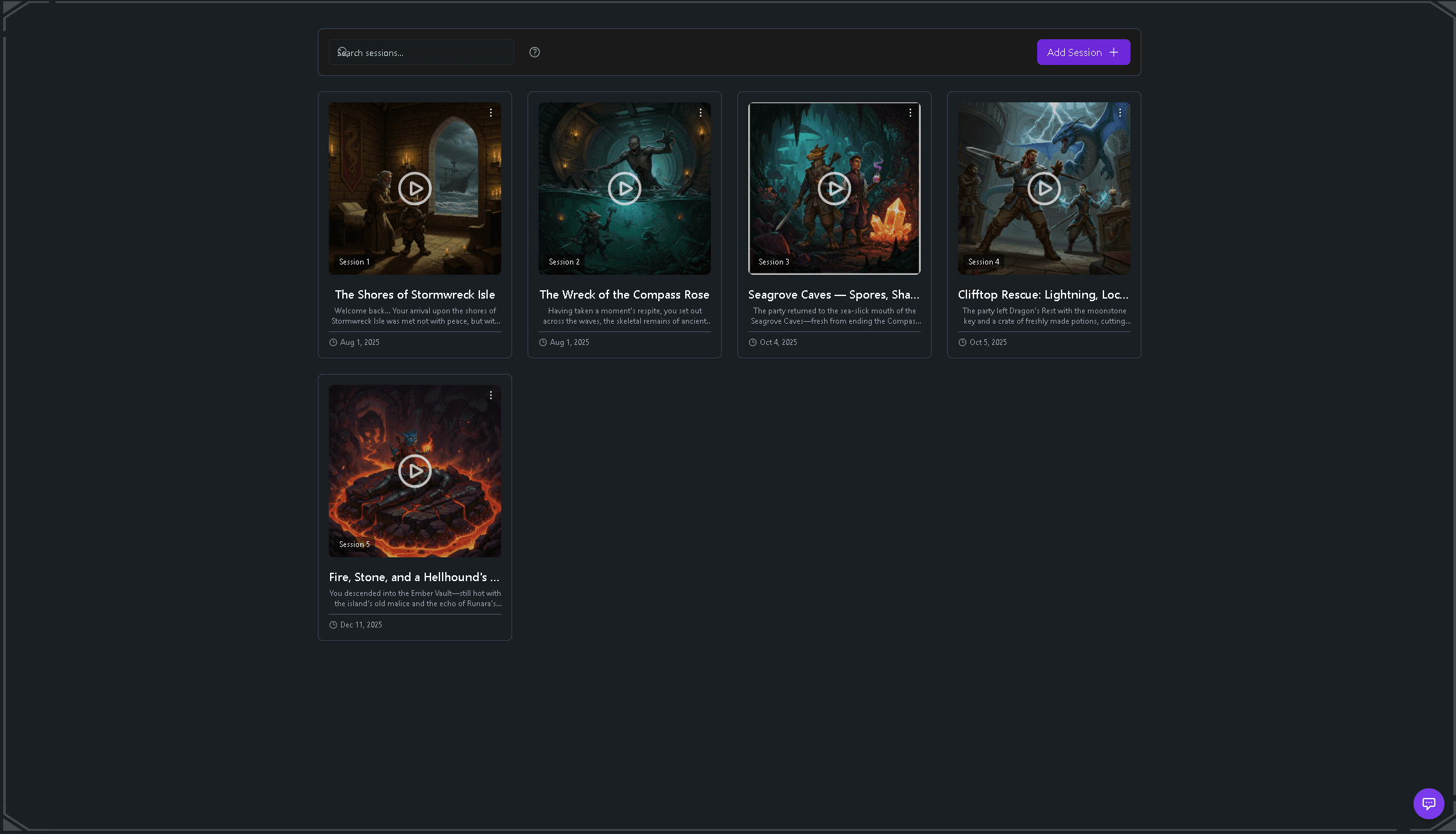
From that one file, Tavern Scribe generates a complete session breakdown automatically:
- A written session recap — the story distilled: what the party did, what changed, what's hanging over next session.
- An event timeline — a chronological feed of the session's moments, with AI-generated imagery for the big ones.
- Character and quest updates — new NPCs, fallen enemies, quest progress, and loot land on the right campaign pages instead of in a doc nobody opens.
- A campaign newspaper — an in-world paper covering the session from multiple journalist perspectives, serious front-page reporting and comedic roasts of your party's decisions alike.
And the part that makes the recap trustworthy: every event stays linked to the exact timestamp in your recording. When someone disputes what the wizard actually promised the hag, you don't argue — you jump to the moment and play it.
Step 4 — Share it with the table, then search it forever
Recaps and campaign memory are shared across the campaign, so the whole table works from the same history. The player who missed Saturday catches up from the recap instead of asking the group chat to re-perform the session.
It compounds from there. Everything the AI extracted is searchable — events, characters, locations, quests, whole-campaign history — and you can ask the campaign Q&A questions like "what do we know about the drowned cult?" and get answers grounded in your actual prior sessions. Because the recaps live in the same workspace as the free virtual tabletop with AI campaign memory, the map, the notes, and the history all belong to one campaign instead of four apps.
Getting good session audio: the tips that actually matter
The AI is forgiving, but audio quality still sets the ceiling on recap quality. Five things move the needle:
- Placement beats hardware. A phone in the center of the table beats an expensive mic sitting next to the loudest player. Equal distance to everyone is the goal.
- One mixed recording, not per-person tracks. Multitrack is for podcast editors. For a summary, you want the room as one continuous story.
- Kill the hum. Fans, AC units, and a speaker blasting tavern ambience are the usual suspects. Keep the music low or move it away from the mic.
- Never pause the recording. You will forget to unpause. Everyone forgets to unpause. Snack breaks are cheaper to record than a lost hour of session is to reconstruct.
- Do a ten-second test. Record the table talking, play it back, and check you can hear the quiet player at the far end. Thirty seconds of checking protects four hours of game.
What one upload gets you
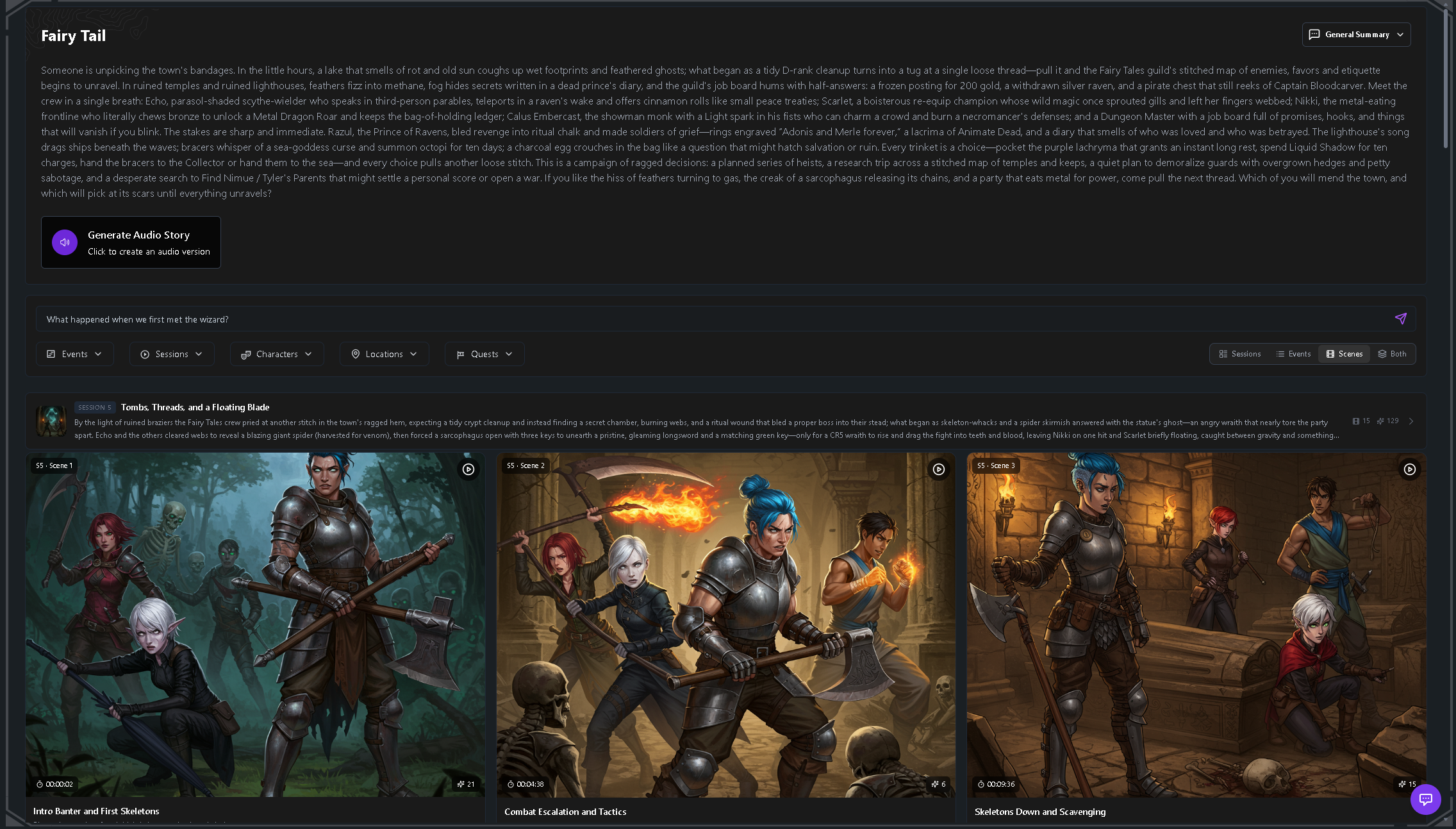
To recap the recap: one audio or video file becomes a written session summary, a timestamped event timeline with imagery, character updates, quest progress, and searchable campaign memory the whole table shares. If you want the shareable-artifact version of the same session, the D&D campaign newspaper generator turns that same recording into an in-world paper written by an AI newsroom of ten distinct writers — each one publishes only when the session gives them material.
None of it requires anyone at the table to take a single note during play. That's the entire point.
Is Tavern Scribe the only tool that does this?
No — there are other dedicated AI notetakers for TTRPG sessions, and if standalone AI-generated notes are the only thing you need, a dedicated notetaker can serve you well.
The structural difference is where the recap lives afterward. A standalone notetaker gives you notes in a notes app; Tavern Scribe's recaps land inside a campaign workspace that also includes a built-in virtual tabletop and the campaign newspaper, so the summary, the map, and the searchable history share one home. We think the recap is better when it lives beside the table it came from — pick based on which shape fits your group.
FAQ
Can AI really summarize a D&D session from audio?
Yes. Upload a session recording — audio or video — to Tavern Scribe and it automatically generates a written recap, a chronological event timeline, character updates, and quest progress, with each event linked to the exact timestamp in the recording where it happened.
Do I need a special microphone to record my session?
No. If you play on the Tavern Scribe VTT or use the Tavern Scribe Discord bot, recording is handled for you. Otherwise a phone in the middle of the table with the mic unobstructed handles an in-person table. Placement and low background noise matter far more than the price of the microphone.
How much does it cost to summarize a session?
The core Tavern Scribe workspace — campaign management, the virtual tabletop, maps, notes — is free. AI session processing uses silver: your first campaign starts with 100 free silver, and after that you can get silver through monthly subscriptions or one-time silver packs. Players can also charge up a shared campaign pool to help fund recaps together. Details on the pricing page.
Does this work for Pathfinder and other TTRPG systems?
Yes. Tavern Scribe is system-agnostic and works for D&D, Pathfinder, Daggerheart, Call of Cthulhu, and homebrew campaigns. It summarizes whatever story your table is telling, regardless of ruleset.
Try it on your next session
You don't have to reorganize your campaign to start. Record Saturday's session with the phone you already own, create a free account, and upload the file. Your first campaign comes with 100 free silver, which means your first automatic recap is free too.
Worst case, you're out ten minutes and you still have a recording of the goat adoption. Best case, nobody at your table ever takes session notes again.
Tags: Ai Session Recap, Session Recording, Session Notes, Dungeon Master Tips, Campaign Management
