

Blades in the Dark Character Sheet: Free Fillable Scoundrel PDF
Download a free two-page scoundrel sheet compatible with Blades in the Dark. Page 1 is everything you mark during a score: stress and trauma with the trauma conditions, three levels of harm, the healing clock, armor, all twelve action ratings under Insight, Prowess and Resolve with their XP tracks, playbook XP, special abilities, coin and stash. Page 2 is load, items, friends and rivals, downtime and notes. It works for any playbook: write yours at the top and your special abilities in their box. Type into it in any PDF viewer or print it blank. No sign-up, no watermark.
2 pages, US Letter · 246 fillable fields · 365 KB · free, no sign-up
What is on it
Every track, in the order you use it.
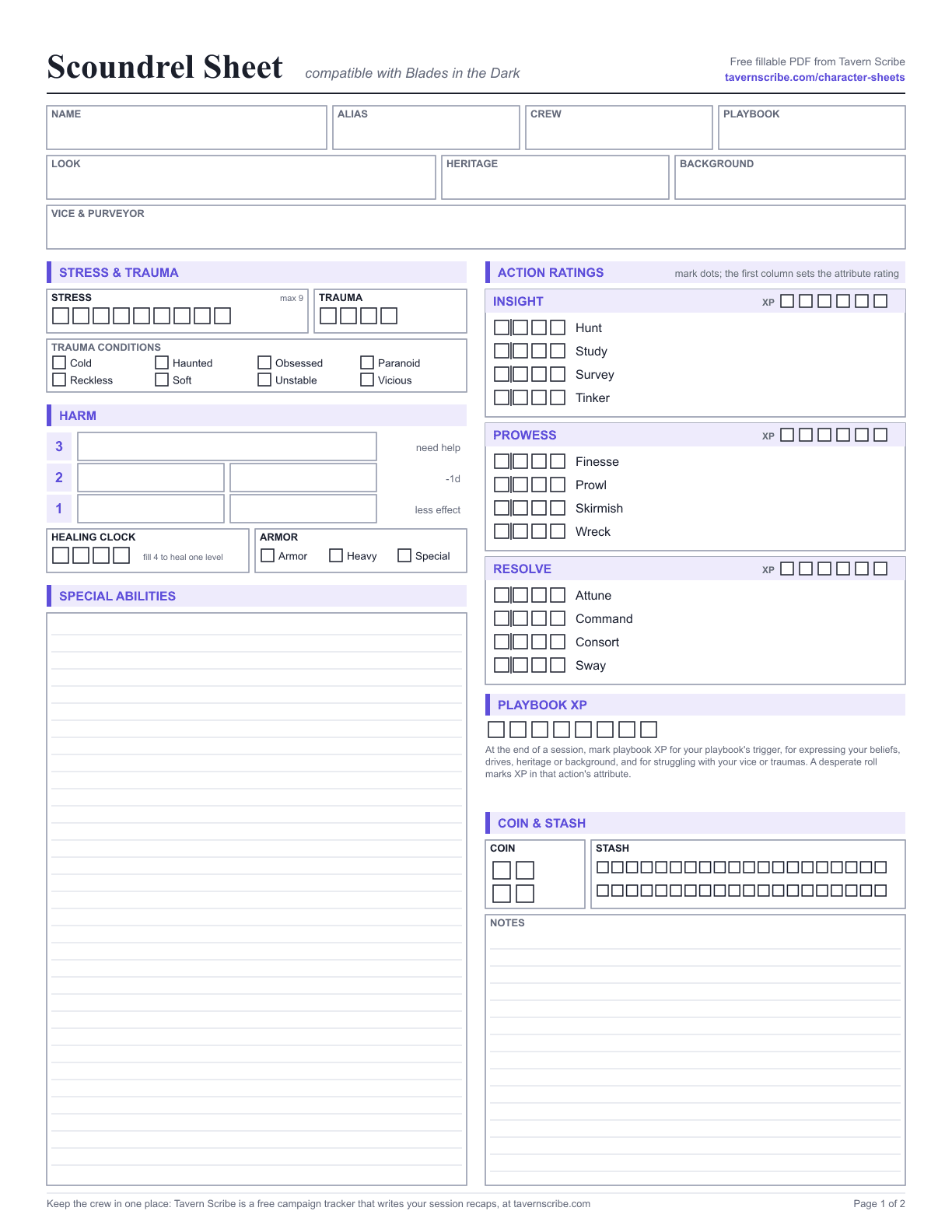
Page 1: everything you mark during a score
- Name, alias, crew, playbook, look, heritage, background, and vice with its purveyor
- Stress (9 boxes) and trauma (4 boxes), with checkboxes for the eight trauma conditions
- Harm at levels 3, 2 and 1, with the penalty for each printed beside it, a healing clock and armor, heavy and special armor boxes
- All twelve action ratings with four dots each, grouped under Insight, Prowess and Resolve, and an XP track for each attribute
- Playbook XP with a reminder of when to mark it
- Coin (4) and stash (40)
- Special abilities and notes
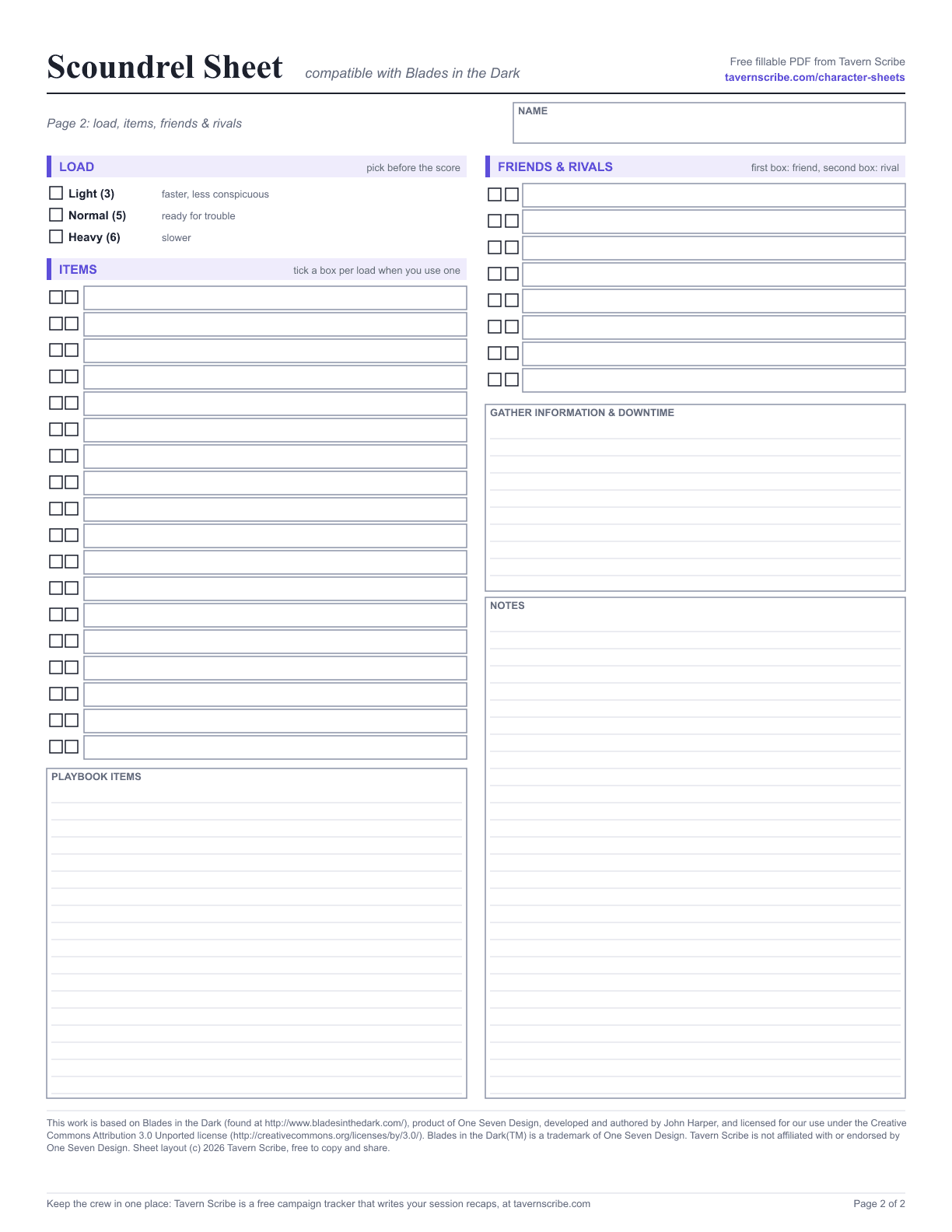
Page 2: load, items & people
- Light, normal or heavy load, chosen before the score
- 18 item rows with load boxes, plus a box for playbook items
- Friends and rivals, with a box to mark each one as friend or rival
- Gathering information and downtime, and notes
- The attribution notice for the Blades in the Dark SRD (CC BY 3.0)
How to use it
Fill it once, keep it honest all campaign.
A few notes on the parts of the sheet that are easy to get wrong at the table.
- Fill it in or print it
- Every box is a real PDF form field, so the sheet works in Adobe Acrobat Reader, Apple Preview, Chrome, Firefox and most phone PDF apps. Use "Save as" after filling so your entries stay in the file. Printing a blank copy works too. It is US Letter; on A4 choose "fit to page".
- Any playbook
- Playbook sheets normally print their own special abilities and items. This one leaves them blank so one sheet fits every playbook: write your playbook at the top, copy the special abilities you take into their box, and list your playbook items on page 2.
- Action dots and attribute ratings
- Mark a dot for each rating in an action. The vertical line after the first dot is a reminder that an attribute's rating is the number of its actions with at least one dot.
- Load and items
- Pick light, normal or heavy load before the score, then tick an item's boxes when you say you had it with you. Items that take two load have two boxes.
Or play off a screen
Run the game in Tavern Scribe.
Blades in the Dark is not one of Tavern Scribe's built-in sheets, but your crew can still play it there. It all lives in a free campaign tracker.
- Add it as your game system. Type Blades in the Dark as the campaign's game system and choose Draft it with AI. The AI drafts rules notes and a sheet definition (stats, skills and trackers) for you to review and edit before it is created.
- A sheet that lays itself out. Character sheets are built from that definition with the same modules every game uses. Everything the engine offers starts switched on, and the DM turns off what the game does not use.
- Bring this PDF along. Prefer paper? Create Character Sheet → PDF Annotate keeps this exact file in the campaign, and AI Import reads a filled copy into a digital sheet.
- The recap writes itself. Record a session and Tavern Scribe writes the recap into the campaign, so the crew's scores and their fallout are there next week.
Questions
Blades in the Dark Compatible sheet FAQ.
Is this the official Blades in the Dark character sheet?
Is the PDF fillable?
Does it work for other Forged in the Dark games?
Can I print it blank?
Can I keep this PDF in Tavern Scribe?
This work is based on Blades in the Dark (found at http://www.bladesinthedark.com/), product of One Seven Design, developed and authored by John Harper, and licensed for our use under the Creative Commons Attribution 3.0 Unported license (http://creativecommons.org/licenses/by/3.0/).
Blades in the Dark™ is a trademark of One Seven Design. Tavern Scribe is not affiliated with or endorsed by One Seven Design. The sheet layout is Tavern Scribe's own.
All sheets: free character sheets.
