

TL;DR — Quick Answer
To run D&D online for the first time, you need three things: a shared screen for maps and tokens, a voice channel, and a way to roll dice everyone can see. A free virtual tabletop covers the first and third; voice can be built in or handled separately. Skip the extra apps where you can — the fewer windows your table has open, the more the session feels like a table and less like a meeting.
Looking for the tool rather than the guide? See the virtual tabletop.
Running D&D online for the first time feels like it should be harder than it is. Most groups overthink the setup and underthink the part that actually breaks sessions: too many tabs, too many logins, and a DM narrating to five frozen video tiles while also trying to track initiative in a spreadsheet. Here's what you actually need, in the order it matters.
What do you actually need to run D&D online?
Three things, nothing more, to start:
- A shared visual surface — a map, even a simple one, so the table isn't guessing at positions.
- A way to talk — voice, at minimum; video helps new tables read each other's reactions.
- A way to roll dice everyone can see — "I rolled a 17" over voice works until someone doesn't trust it.
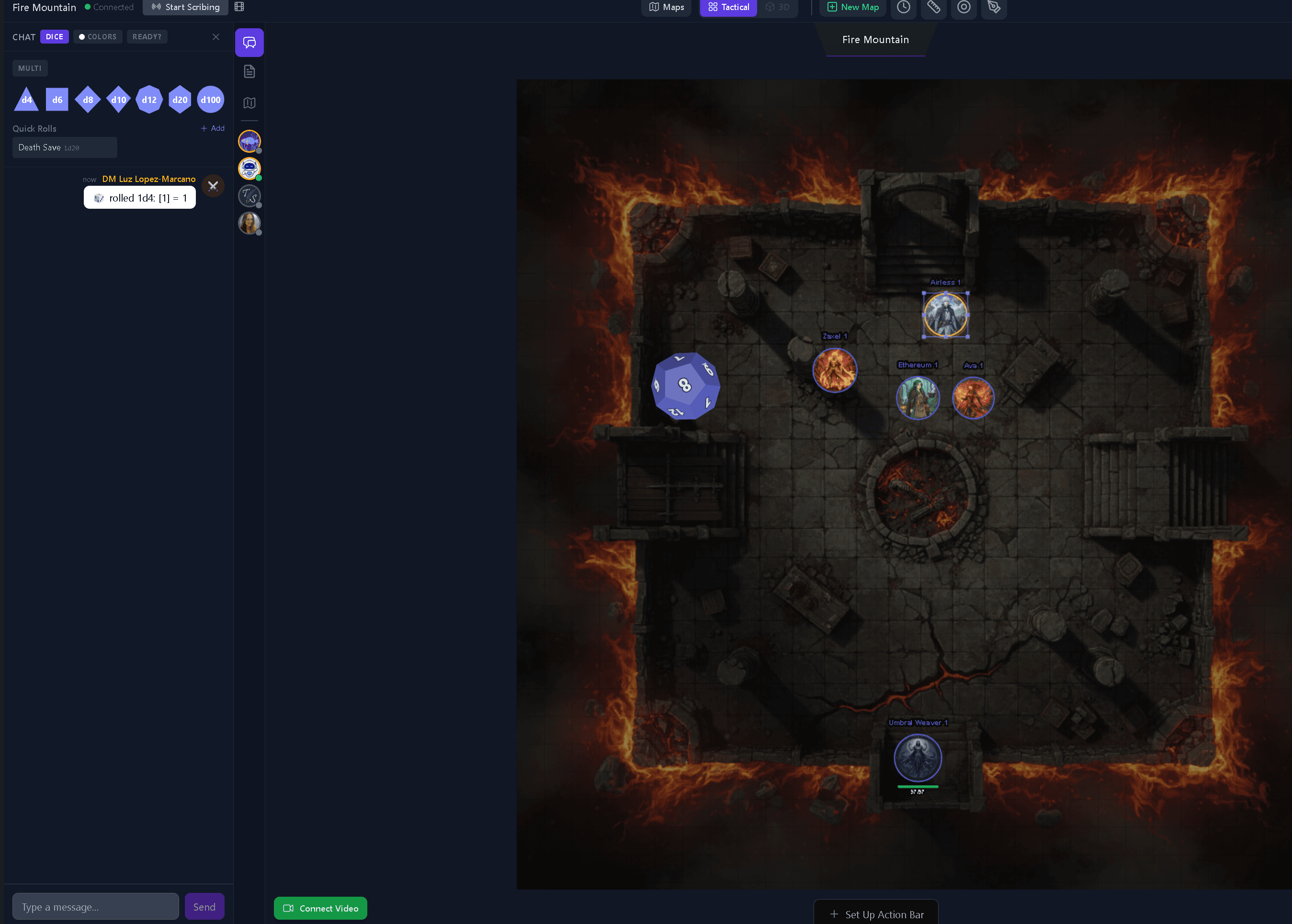
Character sheets, a dice tray, a notes doc — all nice, all addable later. For session one, get the three above working and stop there. A free virtual tabletop like Tavern Scribe's covers the map and the dice in one place, which removes one whole app from the stack before you've even started.
Picking where you'll play: maps, tokens, and combat
You don't need a subscription to get a usable battle map online. Tavern Scribe's virtual tabletop is free to use, runs in the browser with no install, and keeps the table in sync automatically — when you move a token, everyone's screen updates, no refresh, no "can you see this?" Fog of war, a square or hex grid, and an initiative tracker handle the tactical side without a second tool for combat. For the full feature list — weather effects, a spell codex, in-session shops — see a full walkthrough of the VTT.
If your group only ever does theater-of-the-mind, you can skip the battle map entirely and lean on chat and voice. But even a loose location map — a tavern floor plan, a dungeon sketch — gives new players something to point at, which matters more online than in person, where body language fills that gap for free.
Voice, chat, and keeping the table feeling like a table
This is where most first online sessions go wrong, and it's not a technology problem. Five people staring at five video tiles, taking turns to talk because there's no cross-talk tolerance, is a meeting. A table is louder, messier, and full of side comments. A few things help:
- Default to video on, at least for session one — new players read the room better when they can see faces.
- Let the DM mute/unmute freely rather than waiting for a "can everyone hear me."
- Keep chat open alongside voice for dice-roll cards, quick questions, and image sharing without interrupting the scene.
Tavern Scribe's virtual tabletop has real-time party chat with dice-roll cards and video chat built into the same room as the map, so the table isn't switching between a call app and a map app to do two halves of the same conversation.
Do you still need a separate voice app?
Sometimes, yes — and that's fine. Plenty of groups keep their existing Discord server for voice because that's where their friend group already lives, and just point the map and dice at a virtual tabletop in a second tab. If your table already records sessions or plans to, the Tavern Scribe Discord bot's /record start command captures the voice channel directly, which matters for the next section.
Recording the session so the campaign doesn't disappear
Online play has one real advantage over the table in your dining room: it's trivially easy to capture. A session you can't remember two weeks later is a session half-wasted, and "I'll just remember what happened" stops working around week four of a campaign. Tavern Scribe's virtual tabletop has a Start Scribing button that records the session directly from the browser; if your table talks over a separate Discord voice channel instead, the /record start bot command covers that case. Either path turns into campaign history you can search later — who said what, what the party decided, what loot nobody wrote down. Some tables take it a step further and turn the recording into an in-world recap their players actually read; see how to make a D&D campaign newspaper for that path.
Running your first online session zero
Before the first real session, run a short session zero over the same setup you'll use to play: same voice channel, same virtual tabletop tab, same chat. It does two things — it tests your tech with nothing at stake, and it lets new players build a character sheet together instead of alone. A DM running their actual first online session cold, with new tech and new rules at the same time, is asking for a rough night. Separate the two.
What you need for a first online session, as a checklist:
- A free virtual tabletop (map, tokens, dice) OR a VTT + voice app combo
- Voice, video on by default for session one
- A way to record the session (built-in VTT recording or a bot's /record command)
- A session zero to test the setup before the real first session
- Character sheets built together, not emailed in advance
The rules themselves don't change online — if your table needs a refresher on how turns, checks, and combat actually work, D&D Beyond's own guide to how to play covers that separately from the setup question this post answers.
FAQ
Do I need to buy anything to run D&D online?
No. A free virtual tabletop handles maps, tokens, and dice at no cost, and most voice/video options (Discord, or a VTT's built-in video chat) are also free. Paid tools exist, but a first session doesn't need them.
Do I still need Discord if I use a virtual tabletop?
Only if your group already lives there for voice, or wants Discord's recording bot specifically. A virtual tabletop with built-in video chat and party chat can replace it entirely; using both is also fine — many tables do.
How is running D&D online different from running it in person?
Mostly in pacing and attention: side conversations are harder, body language is harder to read, and "can everyone see the map" needs an actual check instead of an assumption. The rules and prep work are identical.
Can I record an online session for a recap later?
Yes. A virtual tabletop with a built-in recording button, or a Discord bot's /record start command, both capture the session audio for a recap afterward — recording the room is one of the few things online play makes easier than in person.
What's the minimum tech setup for a first online session?
A laptop or tablet, a browser, a headset (even earbuds with a mic), and a stable connection. Nothing fancier is required to start.
Start free, your first campaign comes with 100 silver for the AI parts: create your campaign.
Drafted with AI by the Tavern Scribe team and reviewed by a person. Last reviewed 2026-11-21.
Tags: Virtual Tabletop, Dungeon Master Tips, Dnd Tools, Session Recording, Dungeons And Dragons
